
Registered already? click NEXT PAGE now!
It seems some members are having problems with accessing, registering, or using our discussion forum. Therefore this series of pages have been put together to help you through understanding how to REGISTER, how the FORUM works and how to contribute to it, usually referred to as POSTING.
To understand how the FORUM idea works you need to think of it as a set of discussion areas where you can view the discussion or even contribute (POST a reply) if you wish. The TOPIC of conversation is usually set by the first POST in that TOPIC. after that, people respond to the initial POST, and also to subsequent POSTS within that TOPIC.
It is also possible to begin a NEW TOPIC within a FORUM (this will hopefully become more obvious later)
Anyway, to begin, how do we even get to the Forum? The Discussion Forum link in the menu bar to the left will open a NEW window thus enabling you to view the Forum, and still keep this window open as well. You may find it easiest to do this and follow the process I am now going to go through to register yourself on the Forum. Further instruction on navigating the Forum will follow.
The first thing we need to do is REGISTER so that we will be able to gain full access to the Club Discussion area (shown below as SLK General topic forum). You will still be able to view (and POST as a guest) the Public access areas but the until you are REGISTERED you will not have access to the Club discussion area. To REGISTER on the FORUM click on the word REGISTER as shown below:
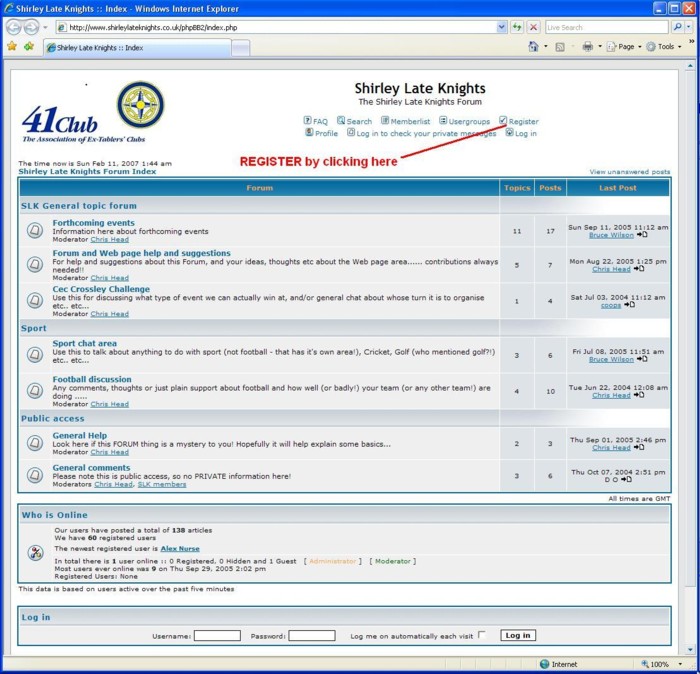
NOTE:- the relevant link is showing in
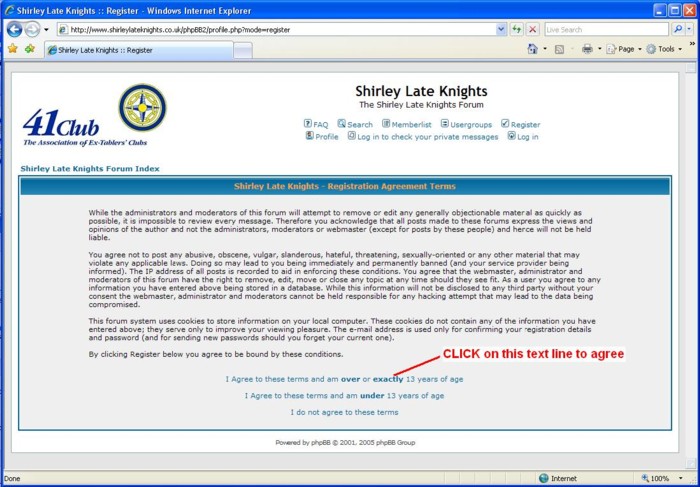
ORANGE as I have highlighted it prior to taking the screenshot by moving my mouse over it. You should find the same on your screen, as you move the mouse over certain words, they change colour, this (usually) signifies a clickable link.This now brings up the Registration Agreement Terms screen, then just click on the words highlighted (assuming you are 13 years or older! .... that's physical age, mental age isn't important..... here...)
Next you will get the Profile Information screen. Don't be scared or put off by this! Put in a suitable Username that enables us to identify you. You may use Capitals and a space, so you can enter your full name, or just a nickname, whichever you prefer! I have added comments (in
RED) to indicate what else is required and what is unnecessary, but the more you can complete (if you know what it means!!) the more it may help others contact you later (or you may not want this, who knows!!)
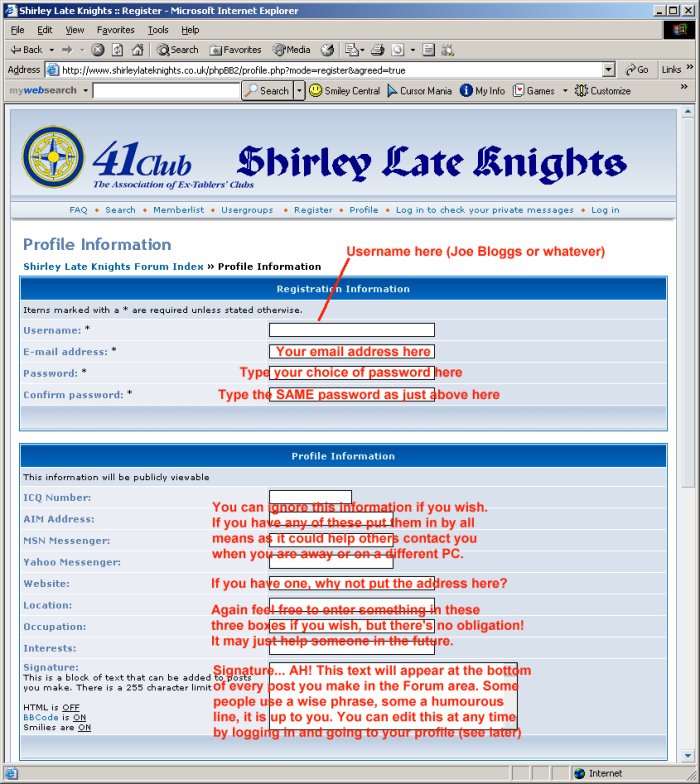
Once you have completed at least you username, email address, password and confirm password fields (and whatever else you wish to complete. However you can come back to these later if you wish) you can scroll to the bottom of the Profile Information page and click on Submit to create your username and REGISTER yourself for the FORUM.
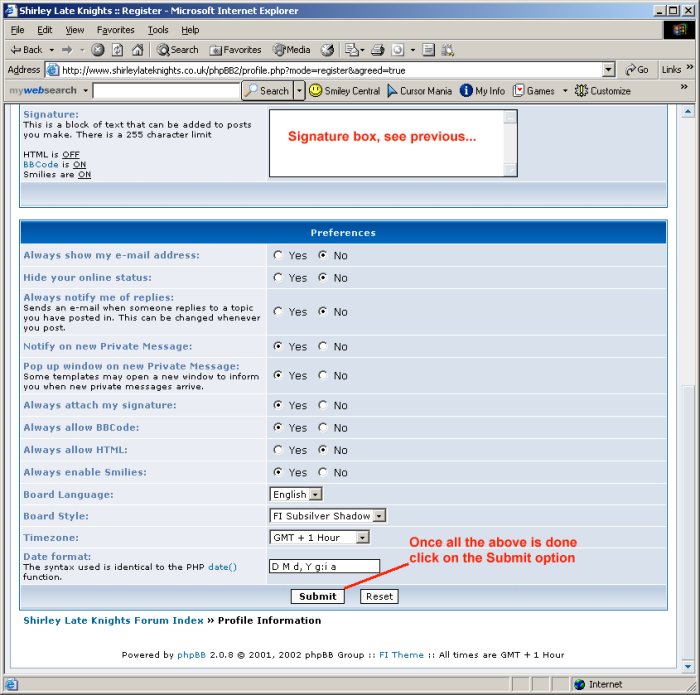
So far this creates your username record on the FORUM and sits there waiting to be ACTIVATED, either by your response to an email (see below) or by an Administrator getting in quick and making your account ACTIVE even before you have had time to respond!
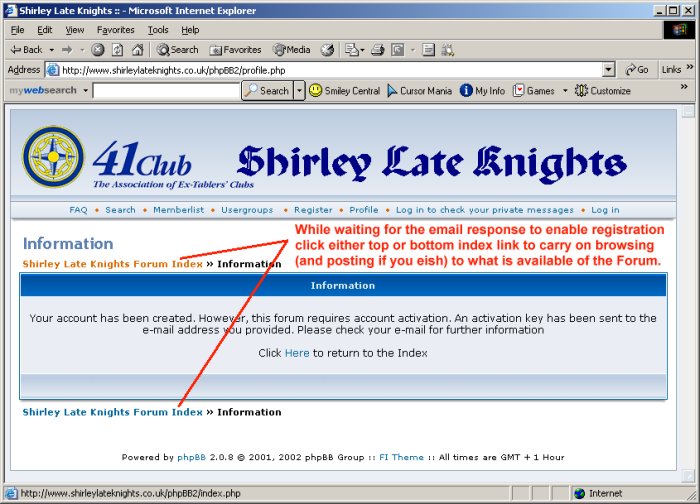
Having followed all the steps above you should have arrived at the screen as shown below. In the meantime while waiting for that email response you may continue browsing as a guest. Just click where shown to go to the main FORUM then click the Forum area of your choice to read:
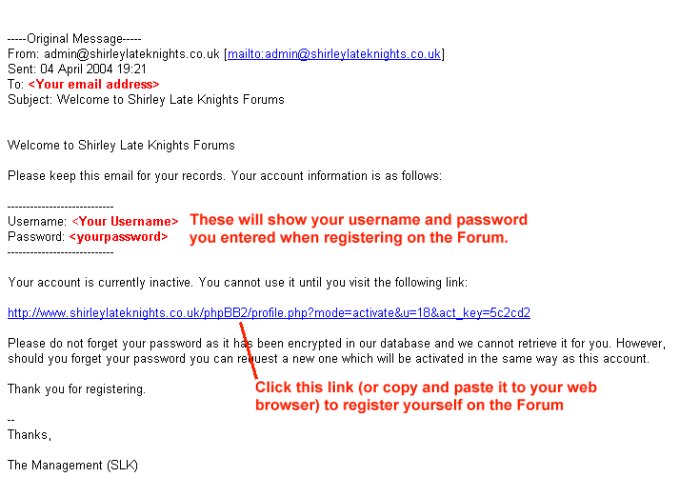
Assuming all the steps above were carried out correctly you should now have an email such as below in your inbox (usually almost immediately!). To ACTIVATE your account click the link shown (or cut and paste it to your browser if your email client is working in strictly text only mode) and this will make it ACTIVE.
So now what? Well, for one thing, if the Club Area is "Closed" to guests and only available to members, you will just have to wait to be made a member of the relevant GROUP of users that have access to the Club Area. You should still be able to post (using your new username and password) to the Public Area perhaps to gee up whoever is Administering users!
Once this has happened you can move on to navigating you way around the FORUM! This is covered on the next page...... (click NEXT PAGE below)
NEXT PAGE

Content Copyright © 2004 - 41 Club The Association of Ex-Tablers' Clubs. All rights reserved.